This article covers everything you need to set up, secure, and consume Symbo webhooks. For signature validation specifics, see:
Validating Symbo Webhooks
Symbo uses HMAC Validation to authenticate webhook requests made to your application. This ensures that the request originates from Symbo and has not been tampered with.
You configure one or more endpoints in Symbo (an HTTPS URL we’ll send requests to).
For each endpoint, you subscribe to one or more events (e.g. call:completed).
When a subscribed event happens in Symbo, we fire an HTTP POST to your endpoint with a JSON body and a signed X-Hmac-Signature header.
Your server verifies the signature, processes the payload, and responds with a 2xx status to acknowledge receipt.
If your server returns a non-2xx status (or doesn’t respond), we’ll log the failure and retry.
Open Organization settings and go to Integrations → Webhooks, or head straight to https://app.symbo.ai/org-settings?type=webhooks.
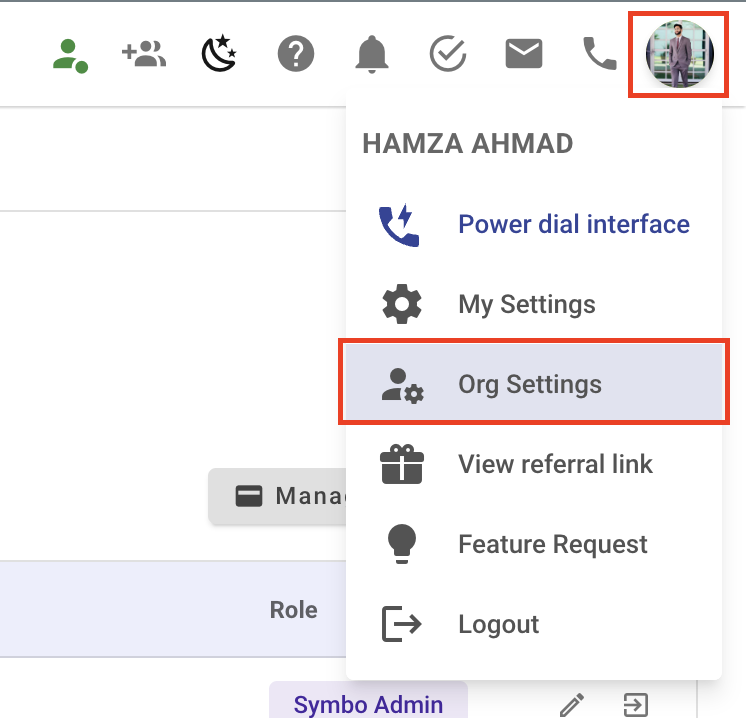
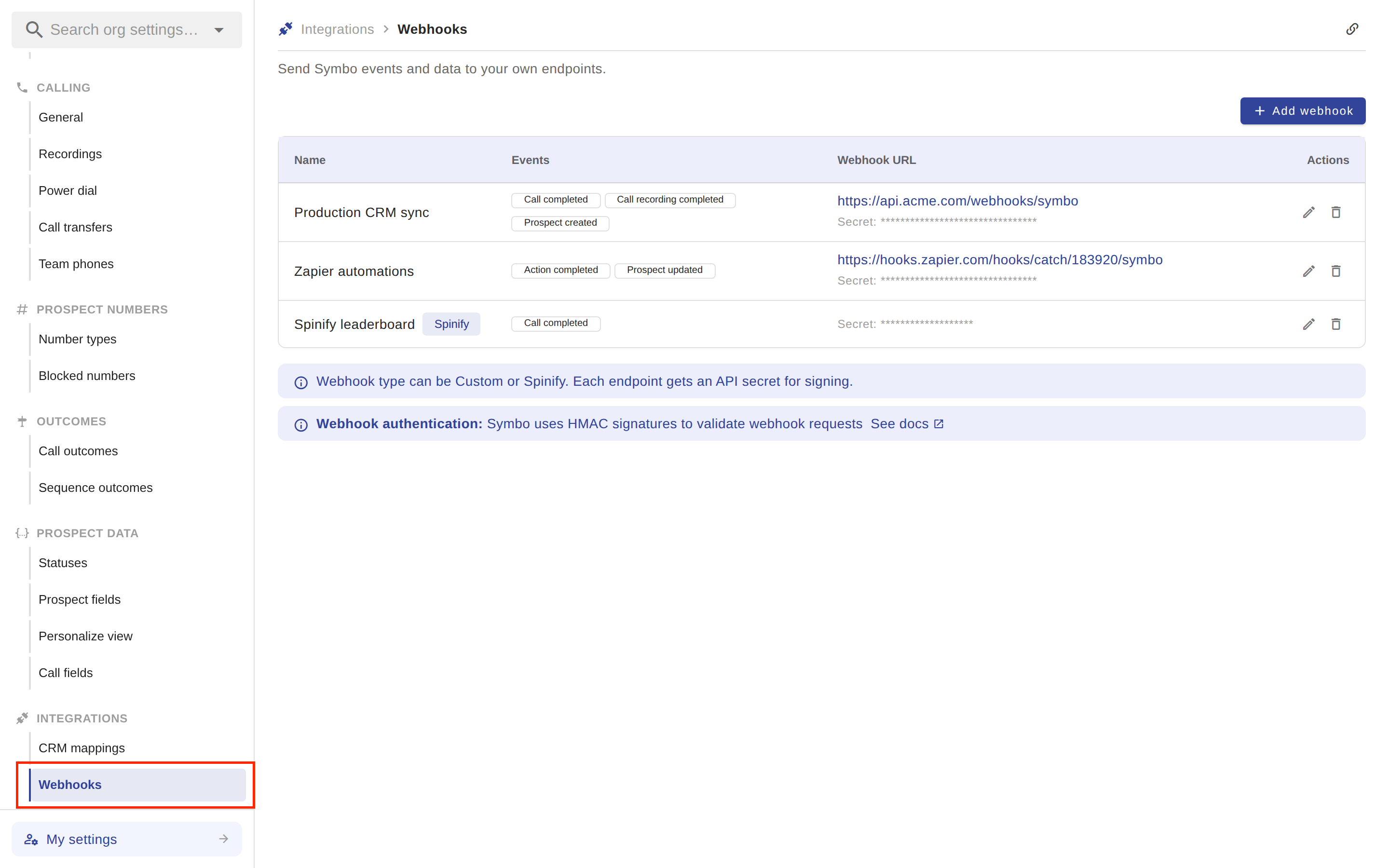
Click Add webhook in the top-right corner of the page.
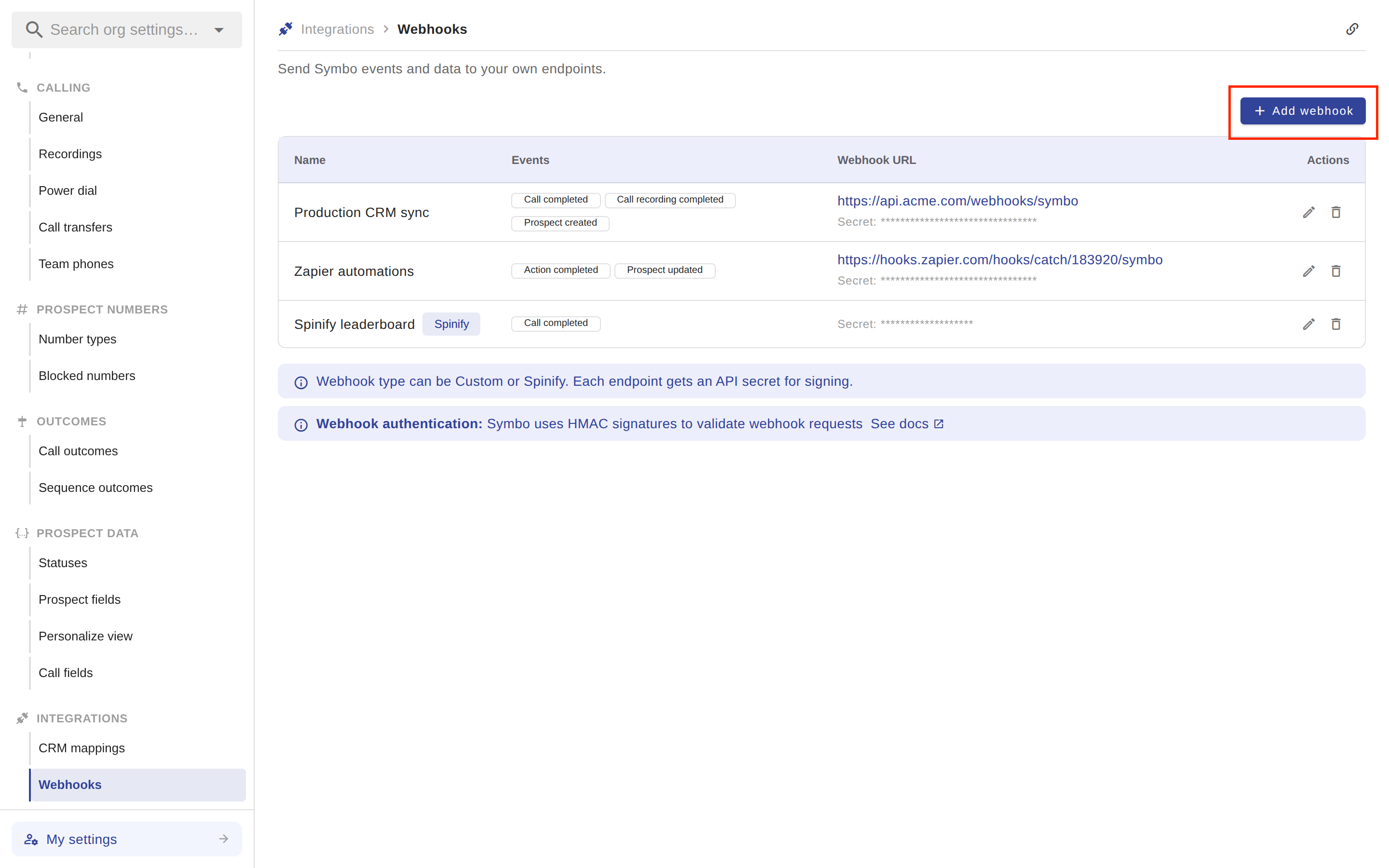
Leave Webhook Type set to Custom. (Spinify is a purpose-built type for the Spinify integration — it asks for a Spinify API secret instead of a URL.)
Name — a friendly label (e.g. “Production CRM sync”).
Events — pick one or more from the list below.
URL — must be https:// and publicly reachable.
Save. Symbo generates a webhook secret for the endpoint. Hover over the endpoint’s row to reveal (eye icon) or copy it — you’ll need it to validate incoming requests.
You can have multiple endpoints, each subscribing to different events. This is useful if you want to fan out call events to one service and prospect events to another.
Event | Object | Method | Triggered When |
call:created | Call | POST | A call is initiated (inbound or outbound) |
call:completed | Call | POST | A call ends — answered or not |
call:updated | Call | POST | A call’s note, disposition, or coaching note changes; also fires on cancel/fail |
call:recording-completed | Call | POST | Recording and transcription are processed and downloadable |
call:contactlookup | Call | GET | A call dials a number not yet linked to a prospect — see special section below |
prospect:created | Prospect | POST | A new prospect is added to Symbo |
prospect:updated | Prospect | POST | A prospect record is modified |
action:completed | Action | POST | A task, call, or email step is marked complete |
action:updated | Action | POST | An action record is modified |
All POST webhooks share the same envelope:
POST /your-webhook-path HTTP/1.1
Host: your-app.com
Content-Type: application/json
X-Hmac-Signature: 7c4b3e9f1a2d8c6b5f0e9d8a7b6c5d4e3f2a1b0c9d8e7f6a5b4c3d2e1f0a9b8c

{
  "id": "evt_01HXYZ...",
  "object": "Call",
  "description": "call:completed",
  "user_id": "usr_01HXYZ...",
  "created_at": "2026-05-04T15:30:00.000Z",
  "data": {
    /* event-specific payload */
  }
}
The envelope fields:
Field | Description |
id | Unique event ID — useful for deduplication and idempotency |
object | The resource type (Call, Prospect, or Action) |
description | The event name (e.g. call:completed) |
user_id | The Symbo user the event is associated with |
created_at | ISO 8601 timestamp of when the event was created |
data | The event-specific payload (see examples below) |
Every POST webhook includes an X-Hmac-Signature header so you can verify the request came from Symbo and wasn’t tampered with.
The signature is computed as:
HMAC-SHA256(JSON.stringify(payload.data), your_webhook_secret)
⚠ Important: The signature is over the inner
dataobject only, not the full envelope. This is the most common cause of validation failures.
Node.js example:
const crypto = require('crypto')

function verifySignature(req) {
  const provided = req.headers['x-hmac-signature']
  const expected = crypto
    .createHmac('sha256', process.env.SYMBO_WEBHOOK_SECRET)
    .update(JSON.stringify(req.body.data))
    .digest('hex')

  return crypto.timingSafeEqual(
    Buffer.from(provided, 'hex'),
    Buffer.from(expected, 'hex')
  )
}
Python example:
import hmac, hashlib, json, os

def verify_signature(request):
    provided = request.headers.get('X-Hmac-Signature')
    expected = hmac.new(
        key=os.environ['SYMBO_WEBHOOK_SECRET'].encode(),
        msg=json.dumps(request.json['data']).encode(),
        digestmod=hashlib.sha256,
    ).hexdigest()
    return hmac.compare_digest(provided, expected)
If signatures don’t match, log the rejection and return a 401. Most validation issues come down to:
Hashing the full envelope instead of just data
Re-serializing data with different key ordering or whitespace (use the parsed object directly, or be careful about how your framework formats JSON)
Mixing up secret values between environments
call:completed{
"id": "evt_01HXYZ8L4N3P5Q6R7S8T9U0V1W",
"object": "Call",
"description": "call:completed",
"user_id": "usr_01HXYZ7K3M2N4P5Q6R7S8T9U0V",
"created_at": "2026-05-04T15:34:12.000Z",
"data": {
"id": "call_01HXYZABC123",
"direction": "outbound",
"from": "+15551234567",
"to": "+15559876543",
"state": "completed",
"dialed_at": "2026-05-04T15:30:00.000Z",
"answered_at": "2026-05-04T15:30:08.000Z",
"completed_at": "2026-05-04T15:34:12.000Z",
"duration_seconds": 244,
"outcome": "connected",
"call_disposition": "Meeting Booked",
"call_disposition_group": "Positive",
"recording_url": null,
"transcription": null,
"rep_overall_sentiment": "positive",
"prospect_overall_sentiment": "positive",
"total_talk_time_millis": 232000,
"rep_talk_time_millis": 102000,
"prospect_talk_time_millis": 130000,
"is_logged_to_crm": true,
"crm_activity_external_id": "0035g00000XYZ",
"note": "Great convo, scheduled demo for Friday.",
"prospect": { "id": "psp_01HXYZ...", "full_name": "Jane Doe", "title": "VP Sales" },
"user": { "id": "usr_01HXYZ...", "first_name": "Sam", "last_name": "Rep" }
}
}
call:recording-completed{
"id": "evt_01HXYZAN6Q5R7S8T9U0V1W2X3Y",
"object": "Call",
"description": "call:recording-completed",
"user_id": "usr_01HXYZ...",
"created_at": "2026-05-04T15:35:30.000Z",
"data": {
"id": "call_01HXYZABC123",
"duration_seconds": 244,
"recording_url": "https://recordings.symbo.ai/call_01HXYZABC123.mp3",
"transcription": "Hi Jane, this is Sam from Iconic...",
"transcription_completed_at": "2026-05-04T15:35:30.000Z",
"transcription_url": "https://recordings.symbo.ai/call_01HXYZABC123.json",
"transcription_json": [
{ "speaker": "rep", "start_ms": 0, "end_ms": 4200, "text": "Hi Jane, this is Sam from Iconic." },
{ "speaker": "prospect", "start_ms": 4500, "end_ms": 6800, "text": "Hi Sam, what's this about?" }
],
"prospect": { "id": "psp_01HXYZ...", "full_name": "Jane Doe" }
}
}
prospect:created{
"id": "evt_01HXYZBP7R6S8T9U0V1W2X3Y4Z",
"object": "Prospect",
"description": "prospect:created",
"user_id": "usr_01HXYZ...",
"created_at": "2026-05-04T14:00:00.000Z",
"data": {
"id": "psp_01HXYZ...",
"first_name": "Jane",
"last_name": "Doe",
"full_name": "Jane Doe",
"title": "VP Sales",
"linkedin_url": "https://linkedin.com/in/janedoe",
"website_url_1": "https://acme.com",
"time_zone": "America/Los_Angeles",
"prospect_status": "active",
"auto_schedule": true,
"tier": "Tier 1",
"segment": "Enterprise"
}
}
Custom prospect fields are flattened into data alongside the standard fields. The exact set depends on your org’s prospect schema.
action:completed{
"id": "evt_01HXYZDR9T8U0V1W2X3Y4Z5A6B",
"object": "Action",
"description": "action:completed",
"user_id": "usr_01HXYZ...",
"created_at": "2026-05-04T15:34:12.000Z",
"data": {
"id": "act_01HXYZ...",
"action_type": "call",
"state": "completed",
"completed": true,
"completed_at": "2026-05-04T15:34:12.000Z",
"due_at": "2026-05-04T15:00:00.000Z",
"scheduled_at": "2026-05-04T15:30:00.000Z",
"subject": "Discovery call with Jane Doe",
"body_html": "<p>Discuss Q3 expansion plans.</p>",
"note": "Meeting booked for Friday.",
"drive_step_id": "dst_01HXYZ...",
"priority": 2,
"is_pinned": false,
"is_private": false
}
}
call:contactlookupUnlike every other webhook, call:contactlookup is a GET request — and it expects you to respond with contact data, which Symbo will then attach to the call.
It fires when a call dials a number that isn’t already linked to a prospect in Symbo, giving you a chance to look up the number in your own CRM and provide the matching contact on the fly.
Request we send:
GET /your-lookup-path?number=%2B15559876543 HTTP/1.1
Host: your-endpoint.com
There is no body and no X-Hmac-Signature on this request.
Response your server must return (status 200):
{
  "first_name": "Jane",
  "last_name": "Doe",
  "external_id": "crm-contact-12345",
  "work_phone": "+15559876543",
  "mobile_phone": "+15559876544",
  "home_phone": null,
  "other_phone": null,
  "work_email": "[email protected]",
  "personal_email": null,
  "account": {
    "external_id": "crm-account-678",
    "name": "Acme Corp"
  }
}
Required fields:
first_name
external_id
If account is included: both account.external_id and account.name
If any required field is missing, or if your server returns a non-200 status, the response is silently dropped and no prospect is created.
We consider a delivery successful if your endpoint returns any 2xx status.
Any other status (or a network failure) increments the retry_count for the event.
We deliver at least once — your code should be idempotent. Use the envelope id as a dedupe key.
Webhook deliveries time out after a short window. Process the payload asynchronously and return 200 quickly; don’t do heavy work in the request handler.
Always validate the signature. Don’t trust the source IP or any other header.
Use HTTPS. We will not deliver to plain http:// URLs.
Respond fast. Aim for under 5 seconds. Push slow work to a queue.
Be idempotent. Use the id field on the envelope to dedupe — the same event can arrive more than once.
Log failures. Recording the body and computed-vs-provided signature on rejection makes debugging a lot easier.
Use separate endpoints per environment. Don’t share a webhook secret between staging and production.
I’m not receiving any webhooks.
Confirm the endpoint URL is publicly reachable over HTTPS.
Confirm at least one event is selected on the endpoint.
Trigger a matching action in Symbo (e.g. complete a call), then check the delivery history.
Signatures aren’t matching.
You’re almost certainly hashing the wrong thing. Hash payload.data, not the full envelope.
Make sure you’re using the secret from the correct endpoint.
Avoid re-serializing the body if your framework changed key order or whitespace — hash the raw JSON-stringified data object as it was received.
My endpoint is being hammered with retries.
Your server is probably returning a non-2xx status. Check the delivery history for the response code we’re seeing.
Still stuck? Message us or email [email protected] with an example event ID from the delivery history and we’ll dig in.
